Harvard CTR citation style in Word citations & bibliography tool
This post was originally written as a forum post made as part of my coursework for M816 Data Management at The Open University. I have preserved it here in full so that it might be of use to a wider audience. The listed date is the date the forum post was first created.
Tl;dr: Word has a built in citation and bibliography utility. There is a Harvard CTR style for this utility made available by UHI library.
Relevant Links:
BibWord (other styles + instructions): https://github.com/codingo/BibWord
Harvard UHI CTR style: https://uhi.libanswers.com/faq/269538
Disclaimer:
I am just your fellow student, sharing a built in utility in word I have found of benefit in the past when writing papers. Please review your bibliography for correctness once it is generated by the utility and correct / modify information if necessary. The utility will only output information based on the information it is given in the source manager and in-text citations placed by the utility.
- - - -
Hi all,
I wanted to share one utility in word that I have found helpful in the past when writing technical papers and may be useful in this course. The citations & bibliography utility is built into most desktop versions of MS Word since about 2007. Through OU we have access to Microsoft 365, often used online, but the desktop version is also accessible through the 365 subscription. Screenshots in this brief tutorial will be a mix of Word 2010 Professional which I own from my time as an undergraduate, and the current version of Word from Microsoft 365 (Word 2024). The utility remains basically unchanged in practice since 2007, I merely installed office 365 desktop to confirm the utility was still available (as it is not available in the online version from what I can tell) and to provide before and after screenshots.
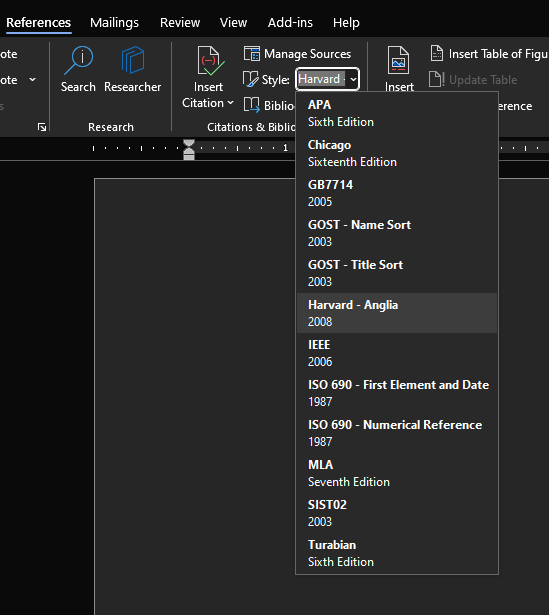
Reference styles and source management can be found under References -> Citations & Bibliography in the ribbon. In a clean installation, the utility has a number of citation styles as seen in the next figure. Among them is a Harvard citation style developed by Anglia Ruskin University (ARU). Note there are several slightly differing variations of the Harvard style (name, year), of which the ARU style is just one.
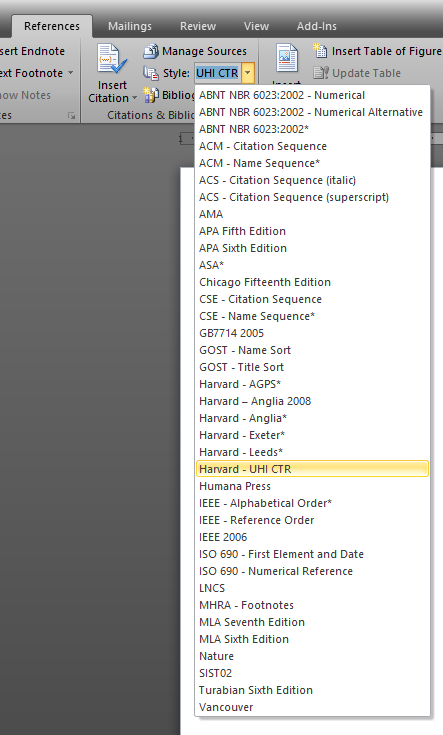
An open source repository of additional styles for this Word utility called BibWord was developed to expand the number of citation styles available. The original repository is no longer accessible, but happily the .xml files and instructions for their installation (for whatever version of word you have, even legacy) have been preserved on GitHub here: https://github.com/codingo/BibWord. BibWord contains several Harvard styles, including another ARU version, as well as AGPS, Exeter and Leeds. A CTR Harvard style is also available, developed by University of the Highlands and Islands (UHI) by modifying one of the BibWord versions. It is available for download here: https://uhi.libanswers.com/faq/269538. When you install all the BibWord styles, including the CTR version, your reference styles list will look like the screenshot below. Note that it is only necessary to install the extra style(s) you need or desire, but you may install all of them if you wish.
I hope you find this brief guide useful. If you have any questions about using the Citations & Bibliography utility in Word, I will help if I am able; please post questions. I have found this utility extremely useful for citation management when writing papers in the past and I hope you will as well.
Best,
Bob
- - - -
Some post script for those that like extremely too much information, such as myself:
Open University’s guide on CTR: https://www5.open.ac.uk/library/referencing-and-plagiarism/quick-guide-to-harvard-referencing-cite-them-right
On the “Harvard System”, by Harvard University (even though they are only loosely / indirectly responsible for the development of said system): https://ask.library.harvard.edu/faq/81735
ARU appear to have deprecated their own version of Harvard, in favor of CTR, despite being the default Harvard template in Word (the irony): https://library.aru.ac.uk/referencing/harvard.htm